Written by Axel, Business Expansion Manager Over a decade of experience in finance and operations across Asia, including roles at a French investment bank in Japan and leading insurance groups, with a focus on regulatory compliance and financial processes. Last reviewed March 2026. |
Key Takeaways
A receipt book contains pre-formatted duplicate or triplicate receipts. You fill out the top copy, and the impression carries through to the copies below.
Every receipt needs seven pieces of information: date, receipt number, payer details, description of goods or services, subtotal, applicable taxes or fees, and grand total. Payment method, buyer name, and a signature are optional but recommended.
If you are a small business owner who handles cash, services, or in-person sales, a receipt book is one of the most practical tools you have. It gives your customer proof of payment and gives you a record that holds up if a dispute or tax question ever surfaces.
In my work across finance and operations — from investment banking to insurance operations across Asia — the businesses with the cleanest records were always the fastest to resolve disputes and the least stressed at audit time. The ones with gaps in their receipt books were not. Filling one out sounds simple, but missing a field, using the wrong ink, or not keeping the duplicate organised are exactly the kind of small errors that create headaches later. This guide walks through each step clearly, with a worked example for standard sales and a separate section for rent receipts.
Research disclosure: This guide is based on standard receipt book formats sold by national office supply retailers and verified against IRS small business recordkeeping guidance. All examples use illustrative figures.
What Is a Receipt Book?
A receipt book is a pad or booklet of pre-printed receipt templates, each with two or three copies bound together. When you press a pen through the top page, a carbonless coating — not traditional carbon paper — transfers the content to the duplicate (and triplicate, if applicable) below.
Receipt books typically come with 50 to 200 pages. Each page has a top copy (usually white) and at least one coloured duplicate (yellow or pink). Some books include pre-printed receipt numbers; others leave that field blank for you to fill in.
How to Fill Out a Receipt Book: 7 Steps
Use a ballpoint pen with black or blue ink. Press firmly enough to transfer through all copies. Never use pencil or erasable ink — either can be altered, which makes the receipt invalid for tax purposes.
Step 1: Write the Transaction Date
Write the full date at the top of the receipt: month, day, and year (e.g., March 30, 2026). This is the transaction date, not the date you write up the receipt.
The date matters for tax filing, warranty tracking, and resolving disputes about when a payment was made.
⚠️ Always use the date the payment was received — not the date you're writing the receipt. If a customer paid on March 28 and you are writing the receipt on March 30, use March 28. For recurring or instalment payments, use the date each individual payment was received, not the date of the first payment or the final total.
Step 2: Fill In the Receipt Number
If your receipt book has pre-printed numbers, use them in order. If not, assign your own — a simple sequential system (001, 002, 003) works fine. Write the number clearly in the designated field, usually in the top-right corner.
Receipt numbers let you cross-reference your financial records and quickly locate a specific transaction — an essential habit for clean bookkeeping and smooth tax filing.
Step 3: Add Your Business and Customer Details
Write your business name and contact information in the header section. If your receipts are pre-printed with your logo and address, you can skip this — otherwise, include:
- Business name
- Address or phone number
- Email (optional, but useful for follow-up)
Some receipt books also have a field labelled "Received from" or "Bill to" — fill in the customer's name there. This is especially useful for service businesses and rent payments.
Step 4: Describe the Goods or Services
Describe each item sold or service provided in plain language, then enter the amount. List each item on its own line in the description column and be specific enough that the receipt makes sense without any additional context.
💡 "Dining Chair — Yellow, Qty 4" is better than just "Chair"
Include quantity and unit price for each line item. Most receipt books have a pre-formatted table for this.
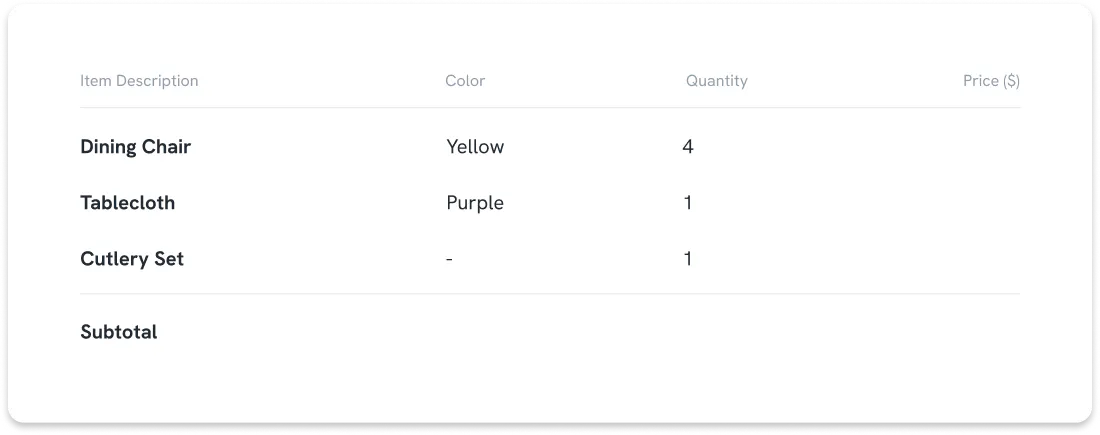

Note for service businesses: Leave product-specific fields like Color blank and use the description column to note the service and date instead.
Step 5: Calculate the Subtotal and Total
For each item, multiply the quantity by the unit price. Add those figures together to get your subtotal, then add sales tax and any fees — or deduct a discount — to reach your grand total.
Write the subtotal and grand total on separate lines so the customer can see the breakdown clearly.
Double-check your figures before moving on — arithmetic errors are the most common source of discrepancies if a customer disputes a charge later.
The example table shows how this should look on your receipt.
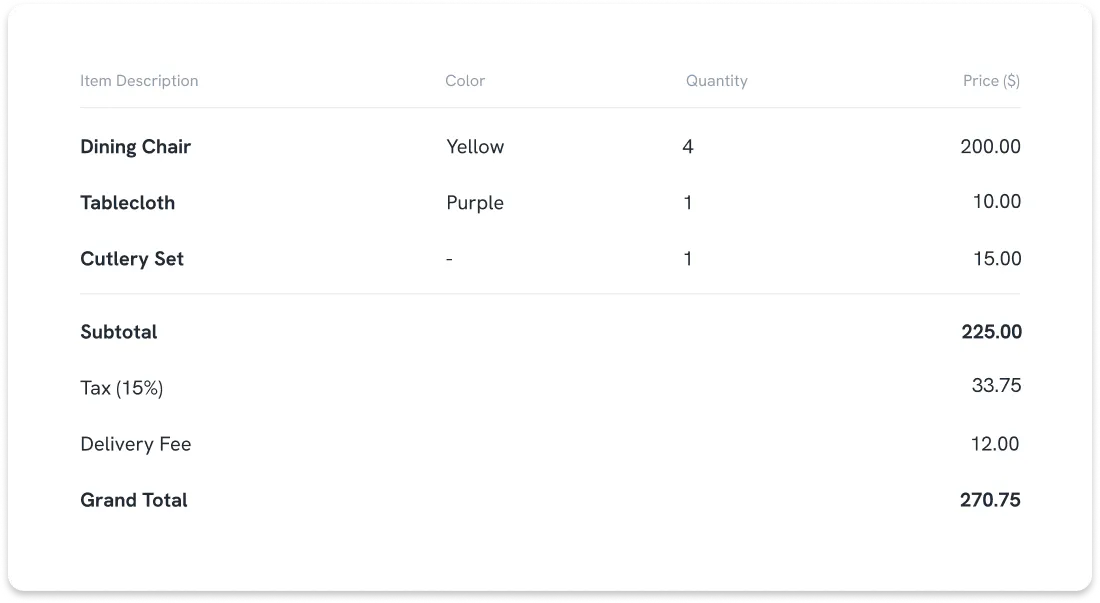
Note for service businesses: Your item lines will show service descriptions and hours or sessions rather than physical goods. The subtotal, tax, and grand total rows work exactly the same way.
Step 6: Note the Payment Method
Record how the customer paid: cash, cheque, credit card, or bank transfer. For cheque payments, note the cheque number.
This field is optional in some books, but worth filling in — it removes any ambiguity about whether the payment was actually received.
Step 7: Sign and Distribute Copies
Sign or initial the receipt to confirm you issued it. Then detach the top copy (white) and hand it to the customer. The duplicate (coloured) copy stays in the book as one of your paper copies for recordkeeping.
📌 Keep the book in order and store completed receipt books for at least three years. According to IRS Publication 583, you should keep business records that support your tax return for at least three years. Some states impose longer retention requirements, so check your local regulations or consult an accountant if you are unsure.
How to Fill Out a Receipt Book for Rent
Rent receipt books follow the same structure as a standard receipt book, with a few field adjustments. Landlords in many US states are legally required to provide a written receipt when a tenant pays rent in cash. California Civil Code §1499 gives tenants the right to request a written receipt for any payment made in performance of an obligation, which includes rent.
Requirements differ by state, so check your local landlord-tenant laws before assuming the rules match your neighbour's.
For a rent receipt, include:
- Date payment was received
- Tenant's full name
- Property address (including unit number)
- Amount paid
- Rental period covered (e.g., "April 2026 rent")
- Payment method
- Landlord's signature
Some office supply stores sell dedicated rent receipt books with these fields pre-printed. If you are using a general receipt book, the standard layout works — just use the description field clearly.
Tips for Filling Out a Receipt Template
The steps above cover what goes in each field. In my experience, the errors that create real problems come from elsewhere: the ink you use, how you handle a mistake mid-receipt, and where the completed book ends up once it is full.
Here are five habits worth building early:
- Always press firmly
The carbonless paper only transfers what you write with enough pressure. Light pencil or felt-tip strokes may not carry through to the duplicate. Use a ballpoint pen and press down. - Never skip the receipt number
Gaps in your receipt number sequence can look suspicious in an audit. If you void a receipt, write "VOID" across it, but keep the page in the book. Do not rip it out. - Correct mistakes the right way
For minor errors like a misspelling, draw a single line through the mistake, write the correction next to it, and initial the change. For significant errors — wrong amount, wrong customer name — void the receipt entirely and write a new one. Mark the voided receipt clearly. - Keep receipts consistent across transactions
Use the same layout, abbreviations, and level of detail every time. Consistency makes your records easier to review at tax time and makes it harder to challenge individual entries. - Store completed books properly
A finished receipt book is a financial document. Keep it somewhere dry, away from direct sunlight, and in the same place you store other business records. Faded carbon copies are not useful evidence.
Send Digital Invoices with Statrys
A receipt book handles cash transactions well. Keep using it for those. But once clients start asking for professional invoices sent before they pay, or you find yourself chasing payments over text, the paper book is no longer the right tool for the job.
The Statrys Invoicing Software replaces that friction. You can create and send a professional invoice in under two minutes, share it however your client prefers — email, WhatsApp, or PDF — and we handle the payment reminders automatically.
Businesses using Statrys cut invoice creation time by 60% and save over 12 hours of admin per week. It is free to start, and no accounting background is required.

Was this article helpful?
Yes
No
FAQs
Are receipt books still used today?
Yes. Receipt books remain common for mobile service businesses (plumbers, cleaners, landscapers), market vendors, landlords collecting cash rent, and any situation where a transaction happens without a POS system. They are inexpensive, require no power, and produce an immediate physical record. For businesses handling larger volumes or billing on terms, the Statrys Invoicing Tool and similar digital platforms are more practical and easier to search at tax time.