Written by Kiru, Accounting Team Lead 7+ years in accounting operations across Singapore, Malaysia, and the Philippines, supporting businesses with bookkeeping, financial reporting, and tax filing. Last reviewed April 2026. |
Key Takeaways
An invoice payment is how a buyer settles what they owe for goods or services. An invoice is a request for payment, not confirmation that payment has been made.
Net 30 is one of the most widely used B2B payment terms in the US. It means payment is due within 30 days of the invoice date.
According to the Intuit QuickBooks 2025 Small Business Late Payments Report, 56% of US small businesses are owed money from unpaid invoices, with the average business carrying $17,500 in outstanding receivables.
The most practical payment methods for most small businesses are bank transfer (ACH) and credit card. ACH settles within one business day in most cases; credit cards add a processing fee but speed up payment.
You send your first invoice, and then nothing happens. No confirmation, no payment, no reply — and you are not sure whether to follow up or whether "Net 30" means the client still has time or is already late.
This guide walks you through invoice payments from the ground up — written for business owners and freelancers handling invoicing without an accountant in the room: what the term means, how the process works end to end, which payment methods to use and when, and how to read the most common payment term abbreviations.
By the end, you will know how to write an invoice that gets paid, what to do when it does not, and how to agree on payment terms that hold up on both sides.
Disclosure: This guide is based on research conducted in March 2026, drawing on official ACH network data from Nacha, the Intuit QuickBooks 2025 Small Business Late Payments Report, and publicly available invoicing and payment guidance.
What Is an Invoice Payment?
An invoice payment is the transfer of money from a buyer to a seller to settle the balance shown on an invoice. The buyer sends the payment; the seller receives it.
The invoice itself is a document that requests payment. It lists what was delivered, the amount owed, how to pay, and when payment is due. An invoice does not mean payment has been made. That is what a receipt is for.
Invoice vs. Bill vs. Receipt: What Is the Difference?
These three terms describe the same transaction from different angles:
| Document | Who creates it | What it means | When it is issued |
|---|---|---|---|
| Invoice | Seller | "You owe me for these goods or services" | After delivery, before payment |
| Bill | Either party (often used informally) | Immediate payment requested | Often on delivery or at the point of service |
| Receipt | Seller | "Payment received, thank you" | After payment is confirmed |
The main difference between a bill and an invoice is timing. A bill typically asks for payment right away (think of a restaurant bill). An invoice gives the buyer a defined window to pay, called payment terms, which can range from 7 days to 90 days.
And regardless of which one you issue, do not send a receipt before you have received payment.

How Does an Invoice Payment Work?
The invoice payment process follows six steps:
- Seller delivers goods or services: The work is done, or the product is shipped.
- Seller issues the invoice: Usually sent by email or through invoicing software. The invoice states the amount, due date, and payment method.
- Buyer receives and reviews the invoice: The buyer checks for discrepancies — amounts that do not match, missing items, or details that conflict with the original purchase order.
- Buyer approves the invoice: In larger organizations, this approval process may require sign-off from an accounts payable (AP) team. In smaller businesses, the owner usually handles it directly.
- Buyer makes payment: Using whichever method the invoice specifies: bank transfer, card, check, etc.
- Seller confirms payment and issues a receipt: Once payment clears, the seller sends a payment receipt or invoicing automation marks it as paid in their system.
💡 Tip: Step 3 is where most invoices get stuck — and usually it is not the buyer's fault. A wrong amount, a missing payment method, something that does not match what was agreed — and it goes into a queue nobody is rushing to clear. Send a clean invoice the first time, and you will not spend the next two weeks chasing.
What Should Be on an Invoice?
A complete invoice prevents the most common causes of delayed payment: missing information, wrong amounts, and unclear instructions. If you need a step-by-step template, our guide on how to make an invoice covers the process in full.
At a minimum, every invoice should include:
- Business name and address: Include your trading name if it differs from your registered name.
- Contact details: An email address and phone number the buyer can use if they have questions about the invoice.
- Buyer's name and address: Get this right. It matters for your records and for their accounts payable team.
- Invoice number: A unique reference for tracking. Keep a sequential system (e.g., INV-001, INV-002).
- Invoice date: The date you issued the invoice, which is when payment terms start counting.
- Description of goods or services: Be specific. In my experience, vague descriptions like "Web design services" are one of the top reasons invoices get disputed. "Website redesign: homepage, about page, contact page, per quote dated January 15, 2026" gives the buyer nothing to push back on.
- Quantity and unit price: List each item, the quantity, and the price per unit.
- Total amount due: Include applicable taxes such as sales tax in the US.
- Payment terms: When payment is due. For example: "Net 30 — payment due by March 31, 2026."
- Payment instructions: How to pay. Include your bank account details for bank transfers, or a payment link for card payments.
📌 Note: Not all invoices follow the same format. There are different types of invoices for different situations: proforma invoices, commercial invoices, tax invoices, and more. Make sure you are using the right one for your transaction.
Invoice Example
Here is how those components look in practice:
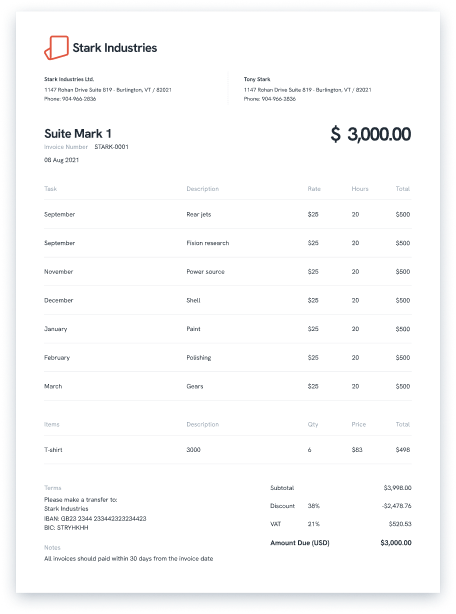
Every field we covered above is visible here — the invoice number, line items with quantities and rates, payment terms, and bank transfer details in the notes.
This is the level of detail that gives a buyer everything they need to process payment without coming back to ask questions.
Invoice Payment Methods: 6 Options Explained
The payment options you accept determine how fast you get paid, what it costs you, and how much admin you create for yourself.
These six options cover most business invoicing situations — pick based on transaction size, frequency, and whether your client is domestic or cross-border.
| Method | Typical speed | Cost to sender | Best for |
|---|---|---|---|
| Bank transfer (ACH) | 1 business day (most cases) | Free or very low | B2B payments up to $1 million |
| Same Day ACH | Same banking day | Small additional fee | Urgent B2B payments |
| Wire transfer | Same day (domestic) / 1–5 days (international) | $15–$35 sender fee | Large or cross-border payments |
| Credit or debit card | Near-instant | 1.5%–3.5% processing fee | Small amounts, consumer invoices |
| Check | 3–5 business days after deposit | Near zero | Low-frequency payments where digital options are unavailable |
| Direct debit / automatic payment | Per agreed schedule | Usually low | Recurring invoices, subscription billing |
1
Bank Transfer (ACH)
ACH (Automated Clearing House) is the most common payment method for US business invoices. The buyer transfers funds directly from their bank account to yours. According to Nacha, around 80% of ACH payments settle within one banking day. Same Day ACH, now available for payments up to $1 million, settles the same banking day for an additional small fee.
ACH transfers are free or very low-cost for most businesses with a standard business banking account. They leave a clean paper trail that simplifies record-keeping, and most platforms update your balances in real-time.
2
Wire Transfer
Wire transfers move money directly between banks. Domestic wires typically settle the same business day. International wire transfers sent through SWIFT (the global bank messaging network) usually take 1 to 3 business days, but can take up to 5 in some corridors.
Senders typically pay a fee of $15 to $35. Wires are most practical for large payments above $25,000 or for cross-border transactions where ACH is not an option.
3
Credit or Debit Card
Credit card payments are fast for the buyer and arrive quickly for the seller, but they come with a cost. Sellers typically pay 1.5% to 3.5% in processing fees per transaction. On a $5,000 invoice, that is $75 to $175 off the top.
Card payments work well for smaller amounts and consumer-facing invoices. For large B2B invoices, most sellers prefer ACH to protect their margin or pass the processing fee on to the buyer.
💡 Tip: The fee conversation comes up most often on international invoices — not because the rate is higher, but because the amounts are larger. A 2.5% fee on a $500 invoice is $12.50. On a $10,000 invoice, it is $250. If the card is the only option your client will use, build the processing cost into your pricing before you send the invoice.
4
Check
Checks are slow and require manual processing, but some industries still use them. A check takes 3 to 5 business days to clear after deposit. There is also a small risk of returned checks.
Unless your client insists on checks, digital invoices with online payment links are worth proposing.
5
Online Payment Platforms
Third-party platforms like PayPal, Stripe, and Square let buyers pay invoices directly through a payment link. They combine the convenience of card payments with invoicing features. Fees typically run 2.9% + $0.30 per transaction for standard card processing — similar to card payments, with the added convenience of a link the buyer can click directly from the invoice.
Check each provider's current pricing page before deciding, as rates vary by plan and transaction type.
6
Direct Debit and Automatic Payment
For recurring invoices — monthly retainers, subscriptions, regular service contracts — direct debit is the most reliable option for both sides. The buyer authorizes the seller to pull payment on agreed dates. No manual action required each month.
Setting this up requires a direct debit mandate, which is a formal authorization from the buyer. Most invoicing platforms handle the mandate process automatically, including Statrys Invoicing, which lets you set recurring payment schedules without manual follow-up each month.
Invoice Payment Terms Explained
Invoice payment terms tell the buyer when and how to pay. Leaving them vague is one of the most common reasons invoices get paid late.
Here are the most common payment term abbreviations used in US B2B invoicing:
| Term | What it means | Example (invoice dated March 1) |
|---|---|---|
| Net 7 | Payment due within 7 days of invoice date | Due March 8 |
| Net 15 | Payment due within 15 days | Due March 16 |
| Net 30 | Payment due within 30 days | Due March 31 |
| Net 60 | Payment due within 60 days | Due April 30 |
| Net 90 | Payment due within 90 days | Due May 30 |
| EOM | End of month: payment due by the last day of the invoice month | Due March 31 |
| 15 MFI | 15th of the month following the invoice date | Due April 15 |
| COD | Cash on delivery: payment due at time of delivery | Payment at handover |
| CIA | Cash in advance: full payment before delivery begins | Payment before work starts |
| 2/10 Net 30 | 2% discount if paid within 10 days; full amount due within 30 days | Pay $980 by March 11, or $1,000 by March 31 |
| Due on receipt | Payment due immediately upon receiving the invoice | Same day as invoice |
Net 30 is one of the most widely used B2B payment terms in the US.
How to Choose Your Payment Terms
The right payment term depends on your cash flow needs, your relationship with the client, and your industry:
- Net 7 or Net 15 for smaller projects, new clients, or any situation where you need cash quickly.
- Net 30 for established client relationships and standard project work.
- 2/10 Net 30 to encourage early payment without requiring it. Early payment discounts like 2% off within 10 days cost you a small amount but improve cash flow and show the client there is a benefit to paying promptly.
- COD or CIA for high-risk clients, very large projects, or first-time relationships where trust is not yet established.
💡 Tip: Whatever term you choose, write the due date out in full on the invoice. I have seen "Net 30" read differently by two people on the same team — one counting from the invoice date, another from the receipt. "Net 30 — payment due by March 31, 2026," leaves no room for that conversation.
What Happens If an Invoice Payment Is Late?
According to the Intuit QuickBooks 2025 Small Business Late Payments Report, 56% of US small businesses are owed money from unpaid invoices at any given time. The average business in that position is carrying $17,500 in outstanding receivables.
Late payments happen for different reasons depending on which side of the invoice you are on:
| From the buyer's side | From the seller's side |
|---|---|
| Accounts payable backlog (common in larger companies) | Incorrect information on the invoice (wrong amount, wrong company name) |
| Invoice queued behind others and missed | Invoice sent to the wrong contact or department |
| Insufficient funds | Missing payment details (no bank account number, no payment link) |
| Invoice sent to the wrong person | Vague payment terms with no explicit due date |
In my experience supporting businesses with bookkeeping and financial reporting across Southeast Asia, the largest single driver of delayed payments is almost always something that could have been caught before the invoice left the sender's hands: a missing purchase order reference, a wrong company name, or payment instructions that do not match the counterpart's banking setup. The friction is rarely intentional.
What to Do When Payment Is Late
- Send a payment reminder immediately
A specific email works better than a vague nudge: "Invoice INV-042 for $5,300 was due March 31. Could you let me know when to expect payment?" Send this on day one of being overdue. For escalating situations, our guide on how to chase outstanding invoices covers what to do when email alone is not enough. - Follow up by phone
If the email gets no response within 2 to 3 business days, call the accounts payable contact directly. - Apply a late payment fee
If your original payment terms included a late fee, issue a revised invoice with the fee applied. Most sellers charge 1% to 1.5% per month (12% to 18% annually).
⚠️ The fee must have been stated in the original terms to be enforceable. Enforceability depends on your state and contract terms — consult a legal professional before pursuing this.
- Pause future work
If a client is consistently late, you have the right to stop work until the outstanding balance is cleared. State this as a straightforward business decision, not a threat. - Consider a collection process
For invoices 90 or more days overdue, a collections agency or small claims court may be your option. Small claims limits vary by state, typically ranging from $2,500 to $25,000 — check your state's rules before pursuing this option.
5 Tips to Get Paid Faster and Pay on Time
Most late payments are not a client problem. They are a process problem — and most of them are preventable before the invoice goes out.
These five habits cover both sides: getting paid faster when you are the seller, and staying on time when you are the buyer.
1
Agree on Terms Before the Work Starts
Confirm payment terms in writing before a project begins. A signed quote or proposal that includes your payment terms is much easier to enforce than a verbal agreement made in passing.
2
Send the Invoice the Day the Work Is Delivered
The sooner the invoice arrives, the sooner the clock starts. Do not wait until the end of the month to batch invoices if you can send them the day the work is done. Delays in sending invoices are one of the most underestimated causes of late payment.
3
Make It Easy to Pay
Include a direct online payment link on the invoice, or state your bank details clearly. Do not make the buyer figure out how to send you money. The fewer steps between receiving the invoice and completing payment, the faster it gets paid.
💡 Tip: Before sending your first invoice to a new client, confirm the exact payment format they need — routing number, payment reference, and account details. A single missing field can push settlement back by 30 days or more while the document goes back for reissuance. One conversation upfront eliminates that cycle entirely.
4
Send a Reminder Before the Due Date
A short reminder sent a few days before the deadline significantly improves payment rates. "Just a note: Invoice INV-042 for $5,300 is due on March 31" is professional and expected. Most clients appreciate it.
5
Use Invoicing Software
Whether you use dedicated invoicing software, an accounting system, or a broader accounting software suite, automation streamlines your invoicing workflows — eliminating manual data entry and cutting down on the errors that cause delays.
How Statrys Helps You Get Paid Faster
Getting invoice payments right is mostly a process problem. The terms, the format, the timing, the follow-up — none of it is complicated on its own. What causes delays is usually a gap somewhere in that chain: a missing detail, a vague due date, an invoice that arrives a week after the work is done.
If your invoice management is still manual and the volume is growing, that gap gets harder to close. Statrys' invoicing tool lets you create professional invoices in minutes, send payment links directly to clients, and set up recurring payment schedules — all connected to a multi-currency business account if you operate across borders.
Was this article helpful?
Yes
No
FAQs
What is an invoice payment?
An invoice payment is the money a buyer transfers to a seller to settle the balance shown on an invoice. The invoice is the request for payment; the invoice payment is the actual transfer of funds. Payment is only complete when the money has cleared and the seller has confirmed receipt.